Bit Font: The 8-Bit Digital Font That Brings Retro Charm to Modern Design
The Enduring Appeal of Pixel-Based Typography
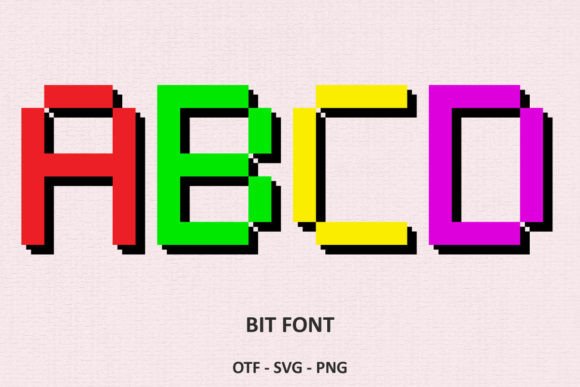
There is something instantly recognizable about the blocky, grid-based letterforms that recall early video game consoles and home computers from the late 1970s and early 1980s. That aesthetic, often called 8-bit or pixel art, has never truly gone away. It survives not merely as nostalgia, but as a deliberate design choice that communicates playfulness, simplicity, and a handmade digital quality. Bit Font is a contemporary typeface that channels this exact spirit. It is not a replica of any single historical font; rather, it distills the essence of early bitmap display typography into a clean, usable typeface suitable for modern projects. The letters are constructed from visible square pixels, giving each character a sturdy, friendly appearance that feels both retro and fresh.
What makes Bit Font stand out in the crowded landscape of pixel fonts is its careful balance between authenticity and readability. Many pixel fonts lean so heavily into the retro look that they become difficult to read at small sizes or in longer passages. Bit Font, by contrast, maintains character shapes that are clearly legible while preserving the chunky, pixelated edges that define the style. This makes it a strong candidate for projects where you want the visual flavor of old-school computing without sacrificing the functional needs of your audience. Whether you are designing for print, screen, or physical cutting machines, the font adapts to your medium while keeping its distinctive personality intact.
Design Characteristics That Define Bit Font
At its core, Bit Font is built around a modular pixel grid. Each letterform occupies a fixed set of pixel units, and the strokes are made from stacked squares rather than smooth curves. This gives the font a uniform texture that works beautifully at multiple scales. The x-height is generous, which improves readability in body text settings, while the uppercase letters have a slightly condensed proportion that evokes early arcade game displays. The numerals and punctuation marks follow the same pixel logic, creating a cohesive system across all characters.
One of the more subtle features of Bit Font is the way it handles diagonal lines. Instead of forcing rough stair-step patterns that can look jagged, the font uses carefully placed pixel offsets to create smoother diagonals without breaking the 8-bit illusion. This attention to detail means the font does not look crude or unfinished; it looks intentionally designed within a constraint. The result is a typeface that feels authentic to the pixel art tradition but also refined enough for professional use. The black version of Bit Font is the standard solid-color variant, while the color version introduces additional depth, allowing certain pixels to be rendered in different hues for a more vibrant effect.
Creative Applications Across Different Media
The versatility of Bit Font becomes apparent when you consider the range of projects it can serve. Below are some of the most common and effective use cases, each illustrating a different strength of the typeface.
Book Covers and Editorial Design
Pixel fonts have found a natural home on book covers, especially for genres like sci-fi, cyberpunk, gaming culture, and children's literature. Bit Font works well as a display face for titles because its blocky forms grab attention without requiring elaborate ornamentation. Pair it with a clean sans-serif for the subtitle and author name, and you get a cover that signals retro-futurism or playful digital themes. For middle-grade fiction or young adult novels with tech or gaming angles, Bit Font can set the tone before a reader even opens the book.
Birthday Cards and Greeting Cards
There is a natural kinship between pixel art and celebratory messages. Bit Font lends itself to birthday cards, thank-you notes, and holiday greetings because the cute, friendly vibe of the letterforms reinforces warmth and informality. A card that reads "Happy Birthday" in Bit Font feels immediately more playful than one set in a traditional script or serif. The font works especially well when combined with pixel illustrations, simple icons, or geometric borders. Because the black version is fully compatible with cutting machines, you can even create physical card elements with cut-out lettering for added texture.
T-Shirts and Apparel
Apparel design is one of the most popular outlets for retro typography. A Bit Font message on a T-shirt, hoodie, or tote bag instantly communicates a love for old-school gaming and digital culture. The pixel structure of the letters translates well to screen printing because the blocky shapes are easy to separate into solid layers. For multi-color designs, the color version of Bit Font can be used in programs like Photoshop or Illustrator to assign different pixel colors to different parts of each letter, creating a rainbow or gradient effect that stands out on fabric. The black version, meanwhile, offers a crisp, monochrome look that reads clearly from a distance.
Digital Content and Social Media Graphics
For YouTube thumbnails, Instagram posts, Twitch overlays, or streaming banners, Bit Font adds an immediate retro gaming aesthetic. The pixel style resonates strongly with audiences who grew up on 8-bit consoles and with younger viewers who appreciate the retro revival. Using Bit Font for channel names, call-to-action buttons, or quote cards can help content creators build a cohesive visual brand that sets them apart from the sea of slick, modern typography. The font's readability at medium sizes makes it practical for on-screen text, and the color version can be used to match brand palettes without losing the pixel character.
Party Invitations and Event Flyers
Whether you are planning a retro-themed party, a gaming tournament, or a birthday celebration, Bit Font can carry the theme from the invitation through to on-site signage. The chunky letters evoke old arcade marquees and console startup screens, giving the event a cohesive look. You can print the black version for physical invitations or use the color version for digital invites. Pair it with pixelated borders, simple iconography, and bright background colors to complete the effect. The font's friendly appearance also works well for non-gaming events where you want a relaxed, informal tone.
Understanding the Two Versions: Black and Color
One of the most critical aspects of working with Bit Font is knowing which version to use for which purpose. The font is distributed in two distinct formats, and they behave differently depending on your software and hardware.
The Black Version
The black version of Bit Font is a standard monochrome pixel font. Each character is rendered as a solid black shape against a transparent background. This version is fully compatible with a wide range of design applications, including Cricut Design Space and other cutting machines. If you are creating physical cut-outs on a Cricut, Silhouette Cameo, or similar device, the black version is the right choice. The solid shapes produce clean cut lines without any unexpected artifacts. This version also works flawlessly in word processors, presentation software, and basic graphic design tools. You can use it for any project that requires a single-color pixel font without extra embellishments.
The Color Version
The color version of Bit Font is more specialized. It includes additional color information embedded into the glyphs, so certain pixels within each letter can be displayed in different colors. This creates a vibrant, multi-tone effect that is not possible with a standard black font. However, this version has specific software requirements. The color version is compatible with programs such as Photoshop, Illustrator, Silhouette Studio, and Inkscape. These applications can interpret the color data stored in the font file. It is important to note that the OTF and TTF files of the color version are not compatible with Cricut Design Space. If you try to load the color version into Cricut, the software may not render the colors correctly, or the font may not appear at all. For detailed guidance on using both versions across different platforms, you can refer to the Ultimate Font Guide, which covers installation, troubleshooting, and best practices for each format.
Workflows for Different User Groups
The way you integrate Bit Font into your projects will vary based on your role and tools. Here are typical workflows for several user types.
Graphic Designers
For designers working in Photoshop or Illustrator, both versions of Bit Font are accessible. You can install the font files directly into your operating system's font directory, and the application will recognize them. For the color version, make sure you are using a recent version of the software that supports color fonts (Adobe applications have supported color fonts since 2017). Designers often use Bit Font as a display face for headlines, logos, or accent text. Because the pixel structure is visually dominant, it is best to use it sparingly, letting it serve as the focal point of a composition. Pair it with neutral backgrounds and simple layouts to let the typography shine.
Hobbyists and Home Crafters
If you are creating physical projects with a cutting machine, start with the black version of Bit Font. In Cricut Design Space, import the font as you would any other installed typeface. Use the "Weld" tool to combine letters if you are cutting words as a single piece, and adjust the size to suit your material. For vinyl decals, stencils, or iron-on transfers, the black version gives you clean edges and consistent cut paths. You can layer the cut pieces with colored backgrounds to achieve a custom look without needing the color version. Home crafters also use Bit Font for scrapbooking, card making, and custom home decor like wall art or storage labels.
Educators and Researchers
In educational settings, Bit Font can be used to create learning materials with a retro gaming theme to engage students. Worksheets, flashcards, and presentation slides benefit from the font's friendly appearance, especially for younger learners or topics related to computer science history. Researchers studying typography or visual communication may also use Bit Font as a case study in how digital constraints shape design. The font exemplifies the concept of designing within limitations and shows how a simple grid can be manipulated to produce expressive, readable text.
Business Owners and Entrepreneurs
Small business owners in the gaming, entertainment, or children's product spaces can use Bit Font to build a brand identity that stands out. A logo or storefront sign set in Bit Font communicates a specific cultural reference point that resonates with niche audiences. For product packaging, the font adds a handmade, indie feel that differentiates products from mass-market competitors. Business owners should be mindful, however, that the color version's software limitations may affect how the font is rendered across different marketing materials. Keeping a consistent brand guide that specifies which version to use for digital versus physical assets helps avoid inconsistencies.
Practical Tips for Getting the Most Out of Bit Font
Using Bit Font effectively requires attention to a few practical details that can make the difference between a polished design and a messy one. Consider the following observations based on real-world use.
- Scale matters. Bit Font looks best at sizes where the individual pixels are visible but not overwhelming. For print, sizes between 36pt and 72pt work well for headlines. At very small sizes (below 18pt), the pixel grid can become too dense and lose the retro effect. For digital screens, test the font at various pixel dimensions to find the sweet spot where the blocky shapes are crisp without looking chunky.
- Background color influences legibility. Because the black version is solid black, it works best on light or brightly colored backgrounds. For dark backgrounds, consider using the color version with bright pixel accents or create an outline effect in your design software. The contrast between the pixel letters and the background is crucial for readability.
- Combining with other typefaces. Bit Font pairs well with neutral sans-serif fonts like Helvetica, Arial, or Open Sans for secondary text. Avoid pairing it with other pixel fonts, as the competition can create visual chaos. Let Bit Font be the star, and let simpler typefaces support it.
- Color version best practices. If you use the color version, be intentional about color choice. The embedded colors should align with your overall palette. In Photoshop, you can sometimes override the default colors using layer styles, but the degree of control depends on the software. Test early to see how the colors render in your specific application.
- File format awareness. Always keep both the black and color versions on hand. Label them clearly in your font management system so you do not accidentally load the color version into a program that does not support it. This simple habit saves time and frustration.
Comparing Bit Font with Other Pixel Typography Options
There are many pixel fonts available, both free and commercial, but Bit Font occupies a particular niche. Free pixel fonts often lack consistency across character sets, with some letters looking noticeably wider or narrower than others. They may also have incomplete glyph coverage, missing accented characters or punctuation. Bit Font, by contrast, is a professionally developed typeface with full character support and uniform pixel logic. Compared to more decorative pixel fonts that mimic specific console displays (like the font from the original Nintendo Entertainment System), Bit Font is more generic, which is actually an advantage for most design work. It does not scream "I am from this exact console"; it simply says "retro pixel." This versatility makes it suitable for a wider range of projects.
Another difference is the dual-version approach. Most pixel fonts come in only one flavor, usually black or a single color. Bit Font's color version adds a dimension that few competitors offer. The ability to have multi-colored pixels within a single font file opens up creative possibilities that would otherwise require manual pixel editing. For designers who want to save time while adding visual interest, this is a meaningful benefit. The trade-off, of course, is the compatibility limitation with Cricut, but that is clearly documented and manageable with proper workflow planning.
Observations on the Cultural Context of 8-Bit Typography
The continued popularity of fonts like Bit Font is not just about nostalgia. There is a deeper cultural thread that ties pixel aesthetics to ideas of authenticity, simplicity, and creative constraint. In an age of hyper-realistic graphics and infinite typographic options, choosing a pixel font is a deliberate move toward limitation. Designers and creators often find that working within the grid forces them to make clearer compositional decisions. The pixel becomes a unit of structure, and every letter is a small piece of architecture. This resonates with audiences who appreciate craftsmanship and intentionality.
Moreover, the 8-bit look has been embraced by indie game developers, DIY culture, and the maker movement. It signals that something was created by a person, not a corporation. Bit Font carries that same connotation. When you use it on a T-shirt, a card, or a book cover, you are visually aligning your work with a tradition that values creativity over polish. That does not mean the font is unprofessional; rather, it means the professional choices are made in service of a specific aesthetic goal. Understanding this cultural weight can help you use Bit Font more meaningfully, not just as a visual gimmick but as a genuine expression of a design philosophy.
Final Considerations Before Adding Bit Font to Your Toolkit
Before you download and install Bit Font, it is worth taking a moment to assess your typical project needs. If you work primarily in Cricut Design Space or other cutting machine software, the black version will serve you reliably for physical crafts. If your work is digital and you have access to programs like Photoshop or Illustrator, the color version gives you an extra layer of creative control. Many users end up keeping both versions installed, switching between them depending on the task.
It is also wise to read through the Ultimate Font Guide provided with the font. This guide covers installation steps for different operating systems, explains how to access the color version's features, and offers troubleshooting tips for common issues. Taking a few minutes to review the documentation can prevent confusion later, especially if you are new to working with color fonts or pixel typefaces. Bit Font is a tool that rewards thoughtful use; the more you understand its capabilities and limitations, the more effectively you can deploy it in your projects.
Ultimately, Bit Font is a well-crafted digital typeface that fills a specific but meaningful role in the design landscape. It captures the charm of early digital displays while offering the polish and reliability that modern creators expect. Whether you are making a birthday card, designing a book cover, branding a small business, or crafting a T-shirt, Bit Font brings a cute, friendly, and unmistakably retro vibe that connects with audiences on a cultural and emotional level. Add it confidently to your projects, and the results will speak for themselves.